<!DOCTYPE html>
	<html lang="vi" xmlns="http://www.w3.org/1999/xhtml" prefix="og: http://ogp.me/ns#">
	<head>
<title>Hướng dẫn import câu hỏi từ file Excel lên AZtest</title>
<meta name="description" content="Hướng dẫn import câu hỏi từ file Excel lên AZtest - Savefile - Tin tức -...">
<meta name="author" content="taodethitracnghiemonline">
<meta name="copyright" content="taodethitracnghiemonline [contact@aztest.vn]">
<meta name="generator" content="NukeViet v4.5">
<meta name="viewport" content="width=device-width, initial-scale=1">
<meta http-equiv="Content-Type" content="text/html; charset=utf-8">
<meta property="og:title" content="Hướng dẫn import câu hỏi từ file Excel lên AZtest">
<meta property="og:type" content="website">
<meta property="og:description" content="Savefile - Tin tức - http&#x3A;&#x002F;&#x002F;taodethitracnghiemonline.aztest.vn&#x002F;news&#x002F;savefile&#x002F;huong-dan-su-dung-aztest&#x002F;huong-dan-import-cau-hoi-tu-file-excel-len-aztest-1.html">
<meta property="og:site_name" content="taodethitracnghiemonline">
<meta property="og:url" content="http://taodethitracnghiemonline.aztest.vn/news/savefile/huong-dan-su-dung-aztest/huong-dan-import-cau-hoi-tu-file-excel-len-aztest-1.html">
<link rel="shortcut icon" href="http://taodethitracnghiemonline.aztest.vn/uploads/taodethitracnghiemonline/fav.png">
<link rel="canonical" href="http://taodethitracnghiemonline.aztest.vn/news/savefile/huong-dan-su-dung-aztest/huong-dan-import-cau-hoi-tu-file-excel-len-aztest-1.html">
<link rel="alternate" href="http://taodethitracnghiemonline.aztest.vn/news/rss/" title="Tin tức" type="application/rss+xml">
<link rel="alternate" href="http://taodethitracnghiemonline.aztest.vn/news/rss/huong-dan-tao-de-trac-nghiem/" title="Tin tức - Hướng dẫn tạo đề trắc nghiệm" type="application/rss+xml">
<link rel="alternate" href="http://taodethitracnghiemonline.aztest.vn/news/rss/huong-dan-su-dung-aztest/" title="Tin tức - Hướng dẫn sử dụng AZtest" type="application/rss+xml">
<link rel="preload" as="style" href="http://taodethitracnghiemonline.aztest.vn/assets/css/font-awesome.min.css" type="text/css">
<link rel="preload" as="style" href="http://taodethitracnghiemonline.aztest.vn/themes/template_pgd/css/bootstrap.min.css" type="text/css">
<link rel="preload" as="style" href="http://taodethitracnghiemonline.aztest.vn/themes/template_pgd/css/style.css" type="text/css">
<link rel="preload" as="style" href="http://taodethitracnghiemonline.aztest.vn/themes/template_pgd/css/style.responsive.css" type="text/css">
<link rel="preload" as="style" href="http://taodethitracnghiemonline.aztest.vn/themes/default/css/news.css" type="text/css">
<link rel="preload" as="script" href="http://taodethitracnghiemonline.aztest.vn/assets/js/jquery/jquery.min.js" type="text/javascript">
<link rel="preload" as="script" href="http://taodethitracnghiemonline.aztest.vn/assets/js/language/vi.js" type="text/javascript">
<link rel="preload" as="script" href="http://taodethitracnghiemonline.aztest.vn/assets/js/DOMPurify/purify3.js" type="text/javascript">
<link rel="preload" as="script" href="http://taodethitracnghiemonline.aztest.vn/assets/js/global.js" type="text/javascript">
<link rel="preload" as="script" href="http://taodethitracnghiemonline.aztest.vn/assets/js/site.js" type="text/javascript">
<link rel="preload" as="script" href="http://taodethitracnghiemonline.aztest.vn/themes/default/js/news.js" type="text/javascript">
<link rel="preload" as="script" href="http://taodethitracnghiemonline.aztest.vn/themes/template_pgd/js/main.js" type="text/javascript">
<link rel="preload" as="script" href="http://taodethitracnghiemonline.aztest.vn//pagead2.googlesyndication.com/pagead/js/adsbygoogle.js" type="text/javascript">
<link rel="preload" as="script" href="https://www.googletagmanager.com/gtag/js?id=UA-163906928-1" type="text/javascript">
<link rel="preload" as="script" href="http://taodethitracnghiemonline.aztest.vn/themes/template_pgd/js/bootstrap.min.js" type="text/javascript">
<link rel="preload" as="script" href="http://taodethitracnghiemonline.aztest.vn/themes/template_pgd/js/jquery.sticky-kit.min.js" type="text/javascript">
<link rel="StyleSheet" href="http://taodethitracnghiemonline.aztest.vn/assets/css/font-awesome.min.css">
<link rel="StyleSheet" href="http://taodethitracnghiemonline.aztest.vn/themes/template_pgd/css/bootstrap.min.css">
<link rel="StyleSheet" href="http://taodethitracnghiemonline.aztest.vn/themes/template_pgd/css/style.css">
<link rel="StyleSheet" href="http://taodethitracnghiemonline.aztest.vn/themes/template_pgd/css/style.responsive.css">
<link rel="StyleSheet" href="http://taodethitracnghiemonline.aztest.vn/themes/default/css/news.css">
<style>
	body{background: #fff;}
</style>
	<!-- Global site tag (gtag.js) - Google Analytics -->
</head>
	<body>
<div id="print">
	<div id="hd_print">
		<h2 class="pull-left">taodethitracnghiemonline</h2>
		<p class="pull-right"><a title="taodethitracnghiemonline" href="http://taodethitracnghiemonline.aztest.vn/">http://taodethitracnghiemonline.aztest.vn</a></p>
	</div>
	<div class="clear"></div>
	<hr />
	<div id="content">
		<h1>Hướng dẫn import câu hỏi từ file Excel lên AZtest</h1>
		<ul class="list-inline">
			<li>Thứ ba - 04/08/2020 14:16</li>
			<li class="hidden-print txtrequired"><em class="fa fa-print">&nbsp;</em><a title="In ra" href="javascript:;" onclick="window.print()">In ra</a></li>
			<li class="hidden-print txtrequired"><em class="fa fa-power-off">&nbsp;</em><a title="Đóng cửa sổ này" href="javascript:;" onclick="window.close()">Đóng cửa sổ này</a></li>
		</ul>
		<div class="clear"></div>
		<div id="hometext">
			Một trong số những tính năng quan trọng trong quá trình tạo đề thi trắc nghiệm online mà AZtest đã nghiên cứu và tìm hiểu thời gian qua chính là tính năng import câu hỏi từ file Excel. Với tính năng này người dùng có thể trực tiếp tạo đề thi trắc nghiệm trên file Excel và import vào hệ thống.
		</div>
				<div class="imghome">
			<img alt="Hướng dẫn import câu hỏi từ file Excel lên AZtest" src="http://taodethitracnghiemonline.aztest.vn/uploads/taodethitracnghiemonline/news/2020_08/hdexcel1.jpg" width="460" class="img-thumbnail" />
						<p>
				<em>Hướng dẫn import câu hỏi từ file Excel lên AZtest</em>
			</p>
		</div>
		<div class="clear"></div>
		<div id="bodytext" class="clearfix">
			<p dir="ltr" style="text-align: justify;"><span style="font-size:14px;"><span style="font-family:Arial,Helvetica,sans-serif;">Bên cạnh<strong> <a href="https://aztest.vn/news/tin-tuc-thong-bao/huong-dan-cach-import-de-thi-tu-file-ms-word-tinh-nang-cap-nhat-moi-07-2020-515.html">tính năng import câu hỏi từ Word</a></strong>, tính năng import câu hỏi từ file Excel lên AZtest sẽ giúp người dùng tiết kiệm được rất nhiều thời gian thay vì đăng từng câu hỏi bằng cách làm thủ công như trước đây. Vậy các bước import câu hỏi từ file Excel lên AZtest được thực hiện như thế nào? Hãy cùng điểm nhanh quá bài viết của chúng tôi để hiểu rõ hơn về tính năng hữu ích này nhé.&nbsp;</span></span></p>

<p dir="ltr" style="text-align: center;"><span style="font-size:14px;"><span style="font-family:Arial,Helvetica,sans-serif;"><iframe allow="autoplay;" allowfullscreen="" frameborder="0" height="480" src="https://www.youtube.com/embed/h7VJARmnA80?rel=0&amp;autoplay=1" width="600"></iframe><br  />
<em>Video hướng&nbsp;dẫn import câu hỏi từ file Excel lên AZtest</em></span></span></p>

<h2 dir="ltr"><strong>1. Định dạng đề thi theo mẫu chuẩn của hệ thống AZtest</strong></h2>

<p dir="ltr" style="text-align: justify;"><span style="font-size:14px;"><span style="font-family:Arial,Helvetica,sans-serif;">Để có thể import câu hỏi từ file Excel lên <strong><a href="https://aztest.vn/">AZtest</a></strong> thì khâu đầu tiên mà người dùng cần thực hiện chính là tạo đề theo mẫu quy chuẩn mà AZtest đã đưa ra. Cách tạo đề theo mẫu như sau:</span></span></p>

<ul>
	<li dir="ltr">
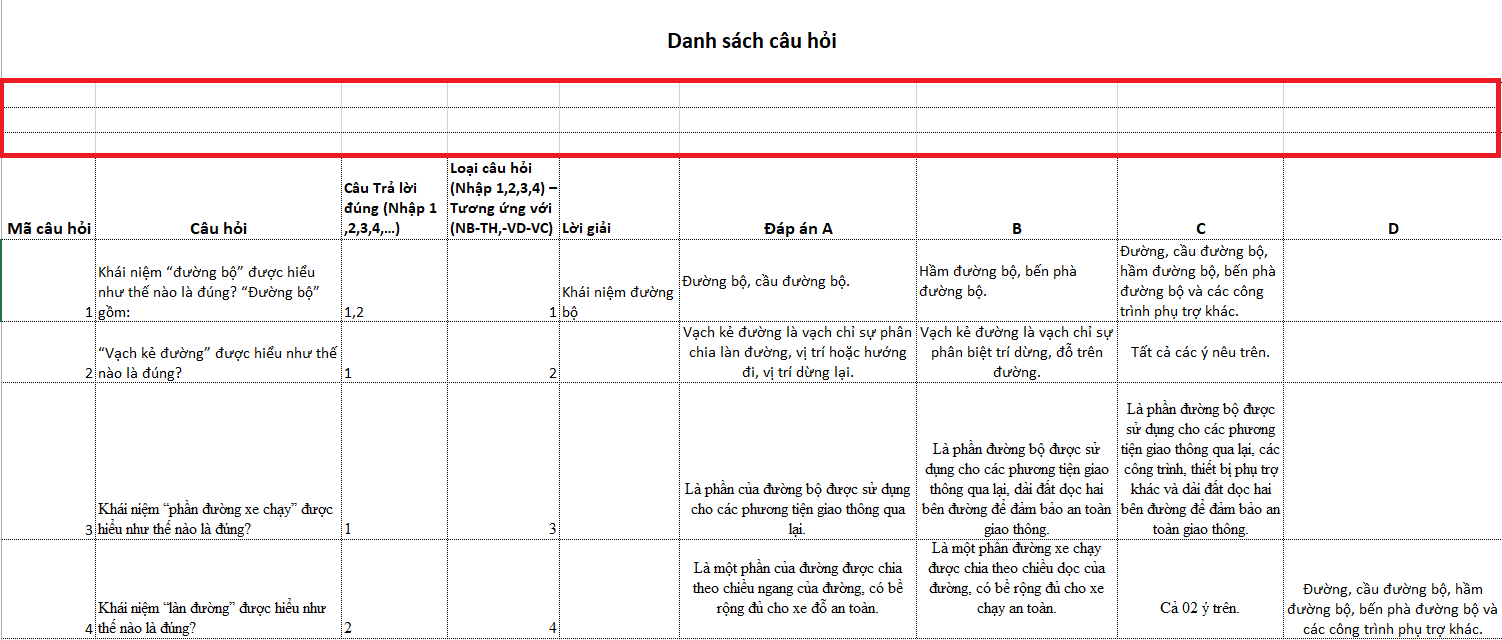
	<p dir="ltr" role="presentation" style="text-align: justify;"><span style="font-size:14px;"><span style="font-family:Arial,Helvetica,sans-serif;">Mở file Excel và tiến hành nhập các trường: Mã câu hỏi, Câu hỏi, Câu trả lời, Loại câu hỏi, Đáp án A, B, C, D.&nbsp;</span></span></p>
	</li>
</ul>

<div style="text-align:center"><img alt="" height="256" src="https://lh4.googleusercontent.com/U6Xn_N5EVo3cTRjIAu_ebS6xZoxf-XMRX5pKC8ChPhsTMIQ1WqLCZeEMH5PtfBer093byGaOak5KErv0fQrf7zRJZUcXXUdRjnhnU6Fsvzt5eAg-_Zt9WGJvGfv8Gct2NrndyQ2B" width="602" /></div>

<ul>
	<li dir="ltr">
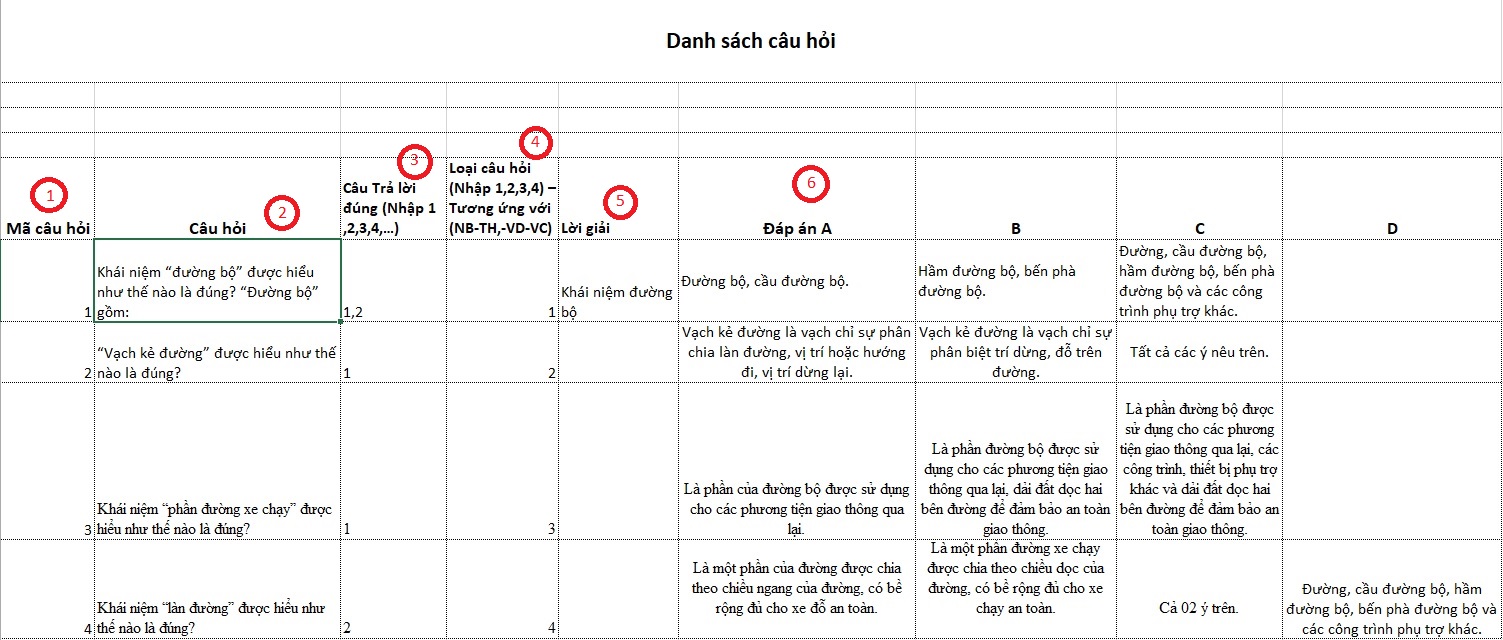
	<p dir="ltr" role="presentation" style="text-align: justify;"><span style="font-size:14px;"><span style="font-family:Arial,Helvetica,sans-serif;">(1) Mã câu hỏi sẽ đánh số thứ tự 1, 2, 3, 4,....</span></span></p>
	</li>
	<li dir="ltr">
	<p dir="ltr" role="presentation" style="text-align: justify;"><span style="font-size:14px;"><span style="font-family:Arial,Helvetica,sans-serif;">(2) Câu hỏi: Người dùng sẽ nhập nội dung câu hỏi theo thứ tự từ trên xuống.</span></span></p>
	</li>
	<li dir="ltr">
	<p dir="ltr" role="presentation" style="text-align: justify;"><span style="font-size:14px;"><span style="font-family:Arial,Helvetica,sans-serif;">(3) Câu trả lời đúng: Đối với câu trả lời đúng sẽ được đánh số thứ tự 1, 2, 3, 4 (Ví dụ: Câu hỏi có 4 đáp án A, B, C, D nếu câu trả lời là A sẽ nhập vào ô là 1 tương tự B đúng sẽ là 2,... Nếu câu hỏi có 2 đáp án A, B thì sẽ nhập là 1,2 tương tự nếu đáp án là C,D thì nhập câu trả lời là 3,4 vào ô câu trả lời đúng theo thứ tự từng câu hỏi)</span></span></p>
	</li>
	<li dir="ltr">
	<p dir="ltr" role="presentation" style="text-align: justify;"><span style="font-size:14px;"><span style="font-family:Arial,Helvetica,sans-serif;">(4) Loại câu hỏi: Nhập 1,2,3,4 tương ứng với NB-TH,-VD-VC</span></span></p>
	</li>
	<li dir="ltr">
	<p dir="ltr" role="presentation" style="text-align: justify;"><span style="font-size:14px;"><span style="font-family:Arial,Helvetica,sans-serif;">(5) Lời giải: Người dùng sẽ nhập lời giải cho từng câu trả lời vào ô lời giải theo thứ tự từ trên xuống như nhập câu hỏi (Lời giải có thể có hoặc không)</span></span></p>
	</li>
	<li dir="ltr">
	<p dir="ltr" role="presentation" style="text-align: justify;"><span style="font-size:14px;"><span style="font-family:Arial,Helvetica,sans-serif;">(6) Đáp án: Với đáp án đầu tiên của câu hỏi bạn cần phải ghi rõ “Đáp án A” còn các đáp án còn lại chỉ cần ghi B, C, D,...</span></span></p>
	</li>
	<li dir="ltr">
	<p dir="ltr" role="presentation" style="text-align: justify;"><span style="font-size:14px;"><span style="font-family:Arial,Helvetica,sans-serif;">Font chữ, kích cỡ chữ trên file sẽ được tự động loại bỏ để có định dạng giống với giao diện website. Vậy nên, khi biên soạn đề bạn không cần phải lưu tâm tới việc định dạng font chữ và cỡ chữ.</span></span></p>
	</li>
</ul>

<p dir="ltr" style="text-align: justify;"><em><span style="font-size:14px;"><span style="font-family:Arial,Helvetica,sans-serif;">*** <u><strong>Lưu ý</strong></u>: Khi tạo file câu hỏi Excel người dùng cần tạo chú ý khoảng cách từ Danh sách câu hỏi đến vị định dạng của các trường Mã câu hỏi, Câu hỏi, Câu trả lời, Loại câu hỏi, Đáp án A, B, C, D. (Khoảng cách này giúp hệ thống nhận diện được vị trí nội dung câu hỏi cần import)</span></span></em></p>
<div style="text-align:center"><img alt="" height="256" src="https://lh5.googleusercontent.com/GgdjwgKI6MGsqfDrzsukYz0vlXRkINxYZhIQSHXt__HHo1IpBSMtT7j74Taag4AExVIqe5y5HgnJRxaJfAypl48Lee-YJYip8PbOQEzk2QgmBXD50m1cafHv4g8ZgL2wFygmyTpF" width="602" /></div>

<h2 dir="ltr"><strong>2. Thực hiện import câu hỏi từ Excel cho đề thi</strong></h2>

<p dir="ltr" style="text-align: justify;"><span style="font-size:14px;"><span style="font-family:Arial,Helvetica,sans-serif;">Sau khi hoàn tất các bước chỉnh sửa đề thi theo cấu hình từ Excel, bây giờ tiến hành import câu hỏi vào đề thi thuộc hệ thống AZtest.</span></span></p>

<p dir="ltr" style="text-align: justify;"><span style="font-size:14px;"><span style="font-family:Arial,Helvetica,sans-serif;"><u><strong>Bước 1:</strong></u> Khi khởi tạo đề thi mới bạn cần chú ý đến <strong>Phương thức tạo câu hỏi</strong>, bạn hãy chọn phương thức: <strong>Câu hỏi từ Excel</strong>.</span></span></p>

<div style="text-align:center"><img alt="" height="292" src="https://lh3.googleusercontent.com/C_gwd3RTp65GfyNAp7hq1OCJJvWYTPJx_5EryqPDwml4TSSFOaiteJBAeSJ-o3dBvNrfbkGULu3owFB69n1_et1oHKMxtWlARXFa_fqEXM9SjOHgYYNSg41gyzgRXV_3QHgCsVmb" width="602" /></div>

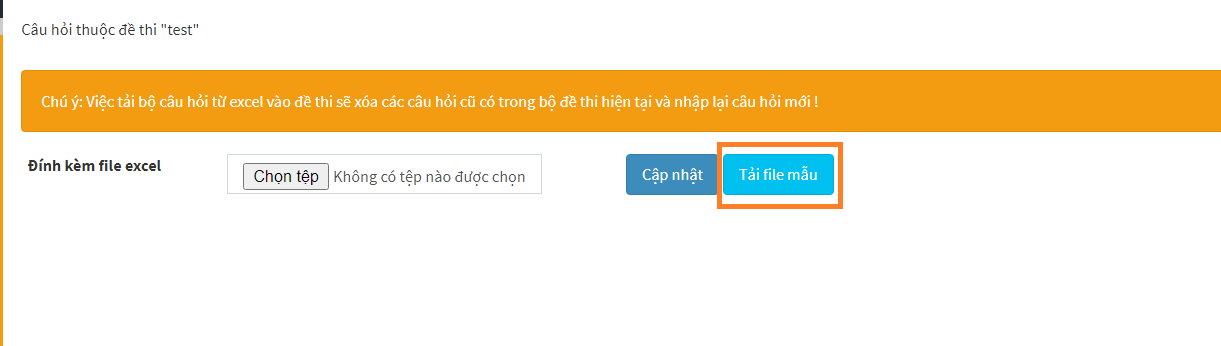
<p dir="ltr" style="text-align: justify;"><span style="font-size:14px;"><span style="font-family:Arial,Helvetica,sans-serif;"><strong><u>Bước 2:</u> </strong>Sau khi tạo đề thi thành công, hệ thống sẽ chuyển bạn đến khu vực Câu hỏi thuộc đề thi. Tại đây, bạn nhấn <strong>Chọn tệp</strong> -&gt; Chọn đến file Excel bạn đã thao tác định dạng theo mẫu.</span></span></p>

<div style="text-align:center"><img alt="" height="172" src="https://lh3.googleusercontent.com/VJc8H9E8IR1vxayLLI0DXQ70Trq66VqHlVooxFPPMRJvmgxx5AhfGGHhBTfi-1Oyt_Oj5nWbE2ZRraNdp0Jl_YdjrXtlBwQBw9OLQeBSWQAFi4IuXYL1NBhlklCx9F6YSYU8lmcS" width="602" /></div>
<em><span style="font-size:14px;"><span style="font-family:Arial,Helvetica,sans-serif;">*** <u><strong>Lưu ý: </strong></u>Người dùng có thể tải file mẫu để định dạng theo file&nbsp;</span></span></em>

<div style="text-align:center"><img alt="" height="171" src="https://lh4.googleusercontent.com/PfBTYuGuGYPdAN_9pYu49VgDGnC9uPH_pP44vpMGHt70TMQafyDhzVIDZFeMWlzHbPyfwRhHcwLHep8cpWOuYtger47A_OswahY-Qp0gTMzYi_tIpa6DGPXsaB4R2Di1GpGqB9v9" width="602" /></div>

<div>&nbsp;</div>

<p dir="ltr"><span style="font-size:14px;"><span style="font-family:Arial,Helvetica,sans-serif;"><u><strong>Bước 3:</strong></u> Sau khi đã tải file lên hệ thống bạn nhấn nhấn <strong>Cập nhật</strong> để hoàn tất quá trình import đề thi từ file Excel lên AZtest.</span></span></p>

<div style="text-align:center"><img alt="" height="219" src="https://lh5.googleusercontent.com/m7BWSrTbM1GleBnjVjajODUOEi7EtLu4rmiwOzOoxZYDub_KcJtqDkRCNxROEbPppeE6rU20ZL5pU_U9upIrVcSM7L5dByp7FQadgRtwQQhYYYbjcGRZeTNWp2yWhy9-U7I04oje" width="602" /></div>

<p dir="ltr"><span style="font-size:14px;"><span style="font-family:Arial,Helvetica,sans-serif;"><u><strong>Bước 4:</strong></u> Sau khi import thành công hệ thống sẽ trình bày nội dung từ file Excel lên giao diện web, bạn có thể xem lại nội dung đề thi tại giao diện này.&nbsp;</span></span></p>

<p dir="ltr"><span style="font-size:14px;"><span style="font-family:Arial,Helvetica,sans-serif;">*** <strong><em><u>Lưu ý:&nbsp;</u></em></strong></span></span></p>

<ul>
	<li dir="ltr">
	<p dir="ltr" role="presentation"><em><span style="font-size:14px;"><span style="font-family:Arial,Helvetica,sans-serif;">Tính năng import câu hỏi từ file Excel chỉ áp dụng cho bộ câu hỏi chứa “text”, riêng với những đề thi “chứa công thức toán học” tính năng import Excel đang phát triển và sẽ thông báo đến người dùng trong thời gian sớm nhất. Hiện tại, để import đề thi chứa công thức Toán học người dùng có thể sử dụng tính năng import câu hỏi từ MS Word.&nbsp;</span></span></em></p>
	</li>
</ul>

<ul>
	<li dir="ltr">
	<p dir="ltr" role="presentation"><em><span style="font-size:14px;"><span style="font-family:Arial,Helvetica,sans-serif;">Nếu phát hiện lỗi, hệ thống sẽ không import câu hỏi vào hệ thống,, lúc này người dùng cần thực hiện kiểm tra lại file định dạng của mình đã đúng với mẫu định dạng theo yêu cầu của AZtest hay chưa.&nbsp;</span></span></em></p>
	</li>
</ul>

<p dir="ltr"><span style="font-size:14px;"><span style="font-family:Arial,Helvetica,sans-serif;">Trên đây là các bước import đề thi từ file Excel lên AZtest. Mong rằng những chia sẻ trên sẽ giúp bạn hiểu rõ hơn về cách sử dụng tính năng này. Nếu có gì thắc mắc có thể liên hệ hotline <span style="color:rgb(192, 57, 43);"><strong>0233. 777. 4455</strong></span> (Ext 3) để được hỗ trợ tư vấn tận tình.&nbsp;</span></span></p>

<p dir="ltr"><em><strong><span style="font-size:14px;"><span style="font-family:Arial,Helvetica,sans-serif;">&gt;&gt;&gt; XEM THÊM: <a href="https://aztest.vn/news/tin-tuc-thong-bao/huong-dan-cach-import-de-thi-tu-file-ms-word-tinh-nang-cap-nhat-moi-07-2020-515.html">Hướng dẫn cách import đề thi từ file MS Word (tính năng cập nhật mới 07/2020)</a></span></span></strong></em><br  />
<span style="font-size:14px;"><span style="font-family:Arial,Helvetica,sans-serif;">--------------------------------------------<br  />
AZtest là hệ thống tạo lập website thi trắc nghiệm trực tuyến do&nbsp;<strong><a href="https://tdfoss.vn/">CÔNG TY TNHH PHÁT TRIỂN VÀ DỊCH VỤ NGUỒN MỞ THUẬN ĐỨC</a>&nbsp;</strong>phát triển.&nbsp;Với AZtest, người dùng có thể dễ dàng sở hữu một website tổ chức ôn tập, thi trắc nghiệm trực tuyến hoàn toàn miễn phí, độc lập, được cá nhân hóa theo yêu cầu của người quản trị.<br  />
Liên hệ hotline&nbsp;<strong>02337774455 (Ext 3)</strong>&nbsp;hoặc Fanpage&nbsp;<a href="https://fb.me/aztest.vn"><strong>https://m.me/aztest.vn</strong></a>&nbsp;để được tư vấn trực tiếp bởi đội ngũ kỹ thuật viên của AZtest.</span></span></p>
<em><strong><span style="font-size:14px;"><span style="font-family:Arial,Helvetica,sans-serif;"> &gt;&gt;&gt; Nguồn:&nbsp;<a href="https://aztest.vn/news/tin-tuc-thong-bao/huong-dan-import-cau-hoi-tu-file-excel-len-aztest-525.html">https://aztest.vn/news/tin-tuc-thong-bao/huong-dan-import-cau-hoi-tu-file-excel-len-aztest-525.html</a></span></span></strong></em>
		</div>
	</div>
	<div id="footer" class="clearfix">
		<div id="url">
			<strong>URL của bản tin này: </strong><a href="http://taodethitracnghiemonline.aztest.vn/news/savefile/huong-dan-su-dung-aztest/huong-dan-import-cau-hoi-tu-file-excel-len-aztest-1.html" title="Hướng dẫn import câu hỏi từ file Excel lên AZtest">http://taodethitracnghiemonline.aztest.vn/news/savefile/huong-dan-su-dung-aztest/huong-dan-import-cau-hoi-tu-file-excel-len-aztest-1.html</a>

		</div>
		<div class="clear"></div>
		<div class="copyright">
			&copy; taodethitracnghiemonline
		</div>
		<div id="contact">
			<a href="mailto:contact@aztest.vn">contact@aztest.vn</a>
		</div>
	</div>
</div>
	<div id="timeoutsess" class="chromeframe">
		Bạn đã không sử dụng Site, <a onclick="timeoutsesscancel();" href="http://taodethitracnghiemonline.aztest.vn/#">Bấm vào đây để duy trì trạng thái đăng nhập</a>. Thời gian chờ: <span id="secField"> 60 </span> giây
	</div>
	<div id="openidResult" class="nv-alert" style="display: none"></div>
	<div id="openidBt" data-result="" data-redirect=""></div>
<div id="run_cronjobs" style="visibility:hidden;display:none;"><img alt="cron" src="/index.php?second=cronjobs&amp;p=k17f9W1f" width="1" height="1" /></div>
<script src="http://taodethitracnghiemonline.aztest.vn/assets/js/jquery/jquery.min.js"></script>
<script>var nv_base_siteurl="/",nv_lang_data="vi",nv_lang_interface="vi",nv_name_variable="nv",nv_fc_variable="op",nv_lang_variable="language",nv_module_name="news",nv_func_name="savefile",nv_is_user=0, nv_my_ofs=7,nv_my_abbr="+07",nv_cookie_prefix="nv4c_4tbfAL",nv_check_pass_mstime=28738000,nv_area_admin=0,nv_safemode=0,theme_responsive=1,nv_recaptcha_ver=2,nv_recaptcha_sitekey="",nv_recaptcha_type="image",XSSsanitize=1;</script>
<script src="http://taodethitracnghiemonline.aztest.vn/assets/js/language/vi.js"></script>
<script src="http://taodethitracnghiemonline.aztest.vn/assets/js/DOMPurify/purify3.js"></script>
<script src="http://taodethitracnghiemonline.aztest.vn/assets/js/global.js"></script>
<script src="http://taodethitracnghiemonline.aztest.vn/assets/js/site.js"></script>
<script src="http://taodethitracnghiemonline.aztest.vn/themes/default/js/news.js"></script>
<script src="http://taodethitracnghiemonline.aztest.vn/themes/template_pgd/js/main.js"></script>
<script async src="http://taodethitracnghiemonline.aztest.vn//pagead2.googlesyndication.com/pagead/js/adsbygoogle.js"></script>
<script>
		  (adsbygoogle = window.adsbygoogle || []).push({
		    google_ad_client: "ca-pub-1191237483249472",
		    enable_page_level_ads: true
		  });
		</script>
<script async src="https://www.googletagmanager.com/gtag/js?id=UA-163906928-1"></script>
<script>
      window.dataLayer = window.dataLayer || [];
      function gtag(){dataLayer.push(arguments);}
      gtag('js', new Date());
      gtag('config', 'UA-163906928-1');
    </script>
<script src="http://taodethitracnghiemonline.aztest.vn/themes/template_pgd/js/bootstrap.min.js"></script>
<script src="http://taodethitracnghiemonline.aztest.vn/themes/template_pgd/js/jquery.sticky-kit.min.js"></script>
<script>
		$(document).ready(function() {
			$('.sticky').stick_in_parent({
				parent: "body",
				offset_top: 10
			});
		});
	</script>
</body>
</html>