<!DOCTYPE html>
	<html lang="vi" xmlns="http://www.w3.org/1999/xhtml" prefix="og: http://ogp.me/ns#">
	<head>
<title>Hướng dẫn tạo đề đánh giá kỹ năng sử dụng Google Trang tính và Tài liệu trong doanh nghiệp</title>
<meta name="description" content="Hướng dẫn tạo đề đánh giá kỹ năng sử dụng Google Trang tính và Tài liệu trong doanh nghiệp - Savefile - Tin tức -...">
<meta name="author" content="taodethitracnghiemonline">
<meta name="copyright" content="taodethitracnghiemonline [contact@aztest.vn]">
<meta name="generator" content="NukeViet v4.5">
<meta name="viewport" content="width=device-width, initial-scale=1">
<meta http-equiv="Content-Type" content="text/html; charset=utf-8">
<meta property="og:title" content="Hướng dẫn tạo đề đánh giá kỹ năng sử dụng Google Trang tính và Tài liệu trong doanh nghiệp">
<meta property="og:type" content="website">
<meta property="og:description" content="Savefile - Tin tức -...">
<meta property="og:site_name" content="taodethitracnghiemonline">
<meta property="og:url" content="http://taodethitracnghiemonline.aztest.vn/news/savefile/huong-dan-tao-de-trac-nghiem/huong-dan-tao-de-danh-gia-ky-nang-su-dung-google-trang-tinh-va-tai-lieu-trong-doanh-nghiep-83.html">
<link rel="shortcut icon" href="http://taodethitracnghiemonline.aztest.vn/uploads/taodethitracnghiemonline/fav.png">
<link rel="canonical" href="http://taodethitracnghiemonline.aztest.vn/news/savefile/huong-dan-tao-de-trac-nghiem/huong-dan-tao-de-danh-gia-ky-nang-su-dung-google-trang-tinh-va-tai-lieu-trong-doanh-nghiep-83.html">
<link rel="alternate" href="http://taodethitracnghiemonline.aztest.vn/news/rss/" title="Tin tức" type="application/rss+xml">
<link rel="alternate" href="http://taodethitracnghiemonline.aztest.vn/news/rss/huong-dan-tao-de-trac-nghiem/" title="Tin tức - Hướng dẫn tạo đề trắc nghiệm" type="application/rss+xml">
<link rel="alternate" href="http://taodethitracnghiemonline.aztest.vn/news/rss/huong-dan-su-dung-aztest/" title="Tin tức - Hướng dẫn sử dụng AZtest" type="application/rss+xml">
<link rel="preload" as="style" href="http://taodethitracnghiemonline.aztest.vn/assets/css/font-awesome.min.css" type="text/css">
<link rel="preload" as="style" href="http://taodethitracnghiemonline.aztest.vn/themes/template_pgd/css/bootstrap.min.css" type="text/css">
<link rel="preload" as="style" href="http://taodethitracnghiemonline.aztest.vn/themes/template_pgd/css/style.css" type="text/css">
<link rel="preload" as="style" href="http://taodethitracnghiemonline.aztest.vn/themes/template_pgd/css/style.responsive.css" type="text/css">
<link rel="preload" as="style" href="http://taodethitracnghiemonline.aztest.vn/themes/default/css/news.css" type="text/css">
<link rel="preload" as="script" href="http://taodethitracnghiemonline.aztest.vn/assets/js/jquery/jquery.min.js" type="text/javascript">
<link rel="preload" as="script" href="http://taodethitracnghiemonline.aztest.vn/assets/js/language/vi.js" type="text/javascript">
<link rel="preload" as="script" href="http://taodethitracnghiemonline.aztest.vn/assets/js/DOMPurify/purify3.js" type="text/javascript">
<link rel="preload" as="script" href="http://taodethitracnghiemonline.aztest.vn/assets/js/global.js" type="text/javascript">
<link rel="preload" as="script" href="http://taodethitracnghiemonline.aztest.vn/assets/js/site.js" type="text/javascript">
<link rel="preload" as="script" href="http://taodethitracnghiemonline.aztest.vn/themes/default/js/news.js" type="text/javascript">
<link rel="preload" as="script" href="http://taodethitracnghiemonline.aztest.vn/themes/template_pgd/js/main.js" type="text/javascript">
<link rel="preload" as="script" href="http://taodethitracnghiemonline.aztest.vn//pagead2.googlesyndication.com/pagead/js/adsbygoogle.js" type="text/javascript">
<link rel="preload" as="script" href="https://www.googletagmanager.com/gtag/js?id=UA-163906928-1" type="text/javascript">
<link rel="preload" as="script" href="http://taodethitracnghiemonline.aztest.vn/themes/template_pgd/js/bootstrap.min.js" type="text/javascript">
<link rel="preload" as="script" href="http://taodethitracnghiemonline.aztest.vn/themes/template_pgd/js/jquery.sticky-kit.min.js" type="text/javascript">
<link rel="StyleSheet" href="http://taodethitracnghiemonline.aztest.vn/assets/css/font-awesome.min.css">
<link rel="StyleSheet" href="http://taodethitracnghiemonline.aztest.vn/themes/template_pgd/css/bootstrap.min.css">
<link rel="StyleSheet" href="http://taodethitracnghiemonline.aztest.vn/themes/template_pgd/css/style.css">
<link rel="StyleSheet" href="http://taodethitracnghiemonline.aztest.vn/themes/template_pgd/css/style.responsive.css">
<link rel="StyleSheet" href="http://taodethitracnghiemonline.aztest.vn/themes/default/css/news.css">
<style>
	body{background: #fff;}
</style>
	<!-- Global site tag (gtag.js) - Google Analytics -->
</head>
	<body>
<div id="print">
	<div id="hd_print">
		<h2 class="pull-left">taodethitracnghiemonline</h2>
		<p class="pull-right"><a title="taodethitracnghiemonline" href="http://taodethitracnghiemonline.aztest.vn/">http://taodethitracnghiemonline.aztest.vn</a></p>
	</div>
	<div class="clear"></div>
	<hr />
	<div id="content">
		<h1>Hướng dẫn tạo đề đánh giá kỹ năng sử dụng Google Trang tính và Tài liệu trong doanh nghiệp</h1>
		<ul class="list-inline">
			<li>Thứ tư - 23/06/2021 11:20</li>
			<li class="hidden-print txtrequired"><em class="fa fa-print">&nbsp;</em><a title="In ra" href="javascript:;" onclick="window.print()">In ra</a></li>
			<li class="hidden-print txtrequired"><em class="fa fa-power-off">&nbsp;</em><a title="Đóng cửa sổ này" href="javascript:;" onclick="window.close()">Đóng cửa sổ này</a></li>
		</ul>
		<div class="clear"></div>
		<div id="hometext">
			Một trong số những công cụ đắc lực được sử dụng rộng rãi, phổ biến nhất trong quá trình làm việc chính là Google trang tính và Google Tài liệu. Đây là những công cụ thông dụng được nhiều người sử dụng đặc biệt là trong quá trình làm việc không những nhân viên mà lãnh đạo cũng thường xuyên sử dụng các công cụ này để theo dõi, thống kê báo cáo. Vậy làm thế nào để đánh giá kỹ năng sử dụng Google Trang tính và Tài liệu trong doanh nghiệp? Hãy cùng điểm nhanh bài viết hôm nay của AZtest để có câu trả lời cho mình nhé.
		</div>
				<div class="imghome">
			<img alt="Hướng dẫn tạo đề đánh giá kỹ năng sử dụng Google Trang tính và Tài liệu trong doanh nghiệp" src="http://taodethitracnghiemonline.aztest.vn/uploads/taodethitracnghiemonline/news/2021_06/tao-de-thi-danh-gia-ky-nang-su-dung-google-trang-tinh-va-tai-lieu.jpg" width="460" class="img-thumbnail" />
						<p>
				<em>Hướng dẫn tạo đề đánh giá kỹ năng sử dụng Google Trang tính và Tài liệu trong doanh nghiệp</em>
			</p>
		</div>
		<div class="clear"></div>
		<div id="bodytext" class="clearfix">
			<h2 dir="ltr" style="text-align: justify;"><strong>Tại sao phải sử dụng Google Trang tính và Google Tài liệu?</strong></h2>

<p dir="ltr" style="text-align: justify;">Trang tính và Google tài liệu đem lại rất nhiều lợi ích cho người dùng trong quá trình sử dụng đặc biệt là trong công việc hàng ngày.&nbsp;</p>

<div style="text-align:center">
<div class="image-center">
<figure class="image" style="display:inline-block"><img alt="kinh nghiem su dung may tinh 1" height="378" src="http://taodethitracnghiemonline.aztest.vn/uploads/taodethitracnghiemonline/news/2021_06/kinh-nghiem-su-dung-may-tinh-1.png" width="800" />
<figcaption><em>Google Trang tính và Google tài liệu đem lại rất nhiều lợi ích cho người dùng trong quá trình sử dụng</em></figcaption>
</figure>
</div>
</div>

<ul>
	<li aria-level="1" dir="ltr">
	<p dir="ltr" role="presentation" style="text-align: justify;">Đối với Google trang tính:</p>
	</li>
</ul>

<ul>
	<li aria-level="1" dir="ltr">
	<p dir="ltr" role="presentation" style="text-align: justify;">Người dùng có thể sử dụng để lập kế hoạch, báo cáo công việc</p>
	</li>
	<li aria-level="1" dir="ltr">
	<p dir="ltr" role="presentation" style="text-align: justify;">Dễ dàng hơn trong việc tạo ngân sách, sản xuất đồ thị và thiết lập biểu đồ</p>
	</li>
	<li aria-level="1" dir="ltr">
	<p dir="ltr" role="presentation" style="text-align: justify;">Hỗ trợ người dùng lưu trữ và sắp xếp dữ liệu</p>
	</li>
	<li aria-level="1" dir="ltr">
	<p dir="ltr" role="presentation" style="text-align: justify;">Giúp tạo danh sách công việc, tạo hóa đơn/ bảng ngân sách</p>
	</li>
</ul>

<p dir="ltr" style="text-align: justify;">Chỉ với công cụ Google trang tính sẽ giúp cho người dùng dễ dàng hơn trong việc tạo, lập báo cáo, thống kê, sắp xếp và lưu trữ,... Với những gì mà Google Trang tính đem lại có thể thấy đây là công cụ rất thiết thực và hữu ích trong quá trình sử dụng đặc biệt là đối với nhân viên văn phòng thì đây sẽ là trợ thủ đắc lực dành cho bạn.</p>

<ul>
	<li aria-level="1" dir="ltr">
	<p dir="ltr" role="presentation" style="text-align: justify;">Đối với Google Tài liệu:</p>
	</li>
</ul>

<ul>
	<li aria-level="1" dir="ltr">
	<p dir="ltr" role="presentation" style="text-align: justify;">Hỗ trợ người dùng trong việc lập kế hoạch&nbsp;</p>
	</li>
	<li aria-level="1" dir="ltr">
	<p dir="ltr" role="presentation" style="text-align: justify;">Giúp lưu trữ quy định, quy tắc trong doanh nghiệp, trong công việc</p>
	</li>
	<li aria-level="1" dir="ltr">
	<p dir="ltr" role="presentation" style="text-align: justify;">Qua Google Tài liệu người dùng có thể thiết lập bản mô tả các dự án&nbsp;</p>
	</li>
	<li aria-level="1" dir="ltr">
	<p dir="ltr" role="presentation" style="text-align: justify;">Ghi chú cho lớp học</p>
	</li>
	<li aria-level="1" dir="ltr">
	<p dir="ltr" role="presentation" style="text-align: justify;">Lưu trữ các mẫu văn bản</p>
	</li>
</ul>

<p dir="ltr" style="text-align: justify;">Với Google Tài liệu người dùng có thể sử dụng để làm rất nhiều việc, vừa đơn giản, dễ dàng lại vừa hiệu quả đem lại rất nhiều lợi ích thì đây quả là công cụ đắc lực không thể thiếu trong công việc hàng ngày.&nbsp;</p>

<h2 dir="ltr" style="text-align: justify;"><strong>Bộ đề thi mẫu: Đề thi đánh giá kỹ năng sử dụng Google Trang tính và Tài liệu</strong></h2>

<p dir="ltr" style="text-align: justify;">Để tạo được đề thi đánh giá kỹ năng sử dụng Google Trang tính và Tài liệu bạn cần lựa chọn phần mềm thi trắc nghiệm chất lượng. Hiện tại, trên thị trường có rất nhiều phần mềm thi trắc nghiệm chất lượng được các doanh nghiệp lựa chọn để sử dụng và một trong số những cái tên nổi trội chính là <a href="https://aztest.vn/">AZtest</a>.&nbsp;</p>

<p dir="ltr" style="text-align: justify;">Là một trong số những sản phẩm được phát triển bởi <a href="https://tdfoss.vn/">Công ty TNHH mã nguồn mở Thuận Đức</a>. Với AZtest doanh nghiệp không những được cung cấp phần mềm mức giá rẻ mà giao diện website còn thân thiện, dễ sử dụng chỉ cần thực hiện các bước đơn giản là người dùng đã có ngay một giao diện website riêng cho chính mình.</p>

<p dir="ltr" style="text-align: justify;">Để giúp doanh nghiệp có thể sử dụng phần mềm AZtest trong quá trình tổ chức thi đánh giá kỹ năng sử dụng Google Trang tính và Tài liệu chúng tôi xin chia sẻ đến bạn các bước cần thực hiện như sau:&nbsp;</p>

<ul>
	<li aria-level="1" dir="ltr">
	<p dir="ltr" role="presentation" style="text-align: justify;">Bước 1: Bạn cần đăng ký khởi tạo tài khoản trên hệ thống AZtest <a href="https://aztest.vn/saas/register/free-co-ban/">tại đây</a>.</p>
	</li>
	<li aria-level="1" dir="ltr">
	<p dir="ltr" role="presentation" style="text-align: justify;">Bước 2: Sau khi khởi tạo thành công, hệ thống sẽ gửi đến email bạn đã đăng ký tài khoản và mật khẩu. Bạn sử dụng tên đăng nhập và mật khẩu đó để đăng nhập tài khoản trên AZtest.</p>
	</li>
	<li aria-level="1" dir="ltr">
	<p dir="ltr" role="presentation" style="text-align: justify;">Bước 3: Bạn tiến hành biên soạn đánh giá kỹ năng sử dụng Google Trang tính và Tài liệu theo các hướng dẫn <a href="https://aztest.vn/tai-lieu/huong-dan/huong-dan-tao-de-thi-trac-nghiem-cho-nguoi-moi-su-dung-25.html">tại đây</a>.</p>
	</li>
</ul>

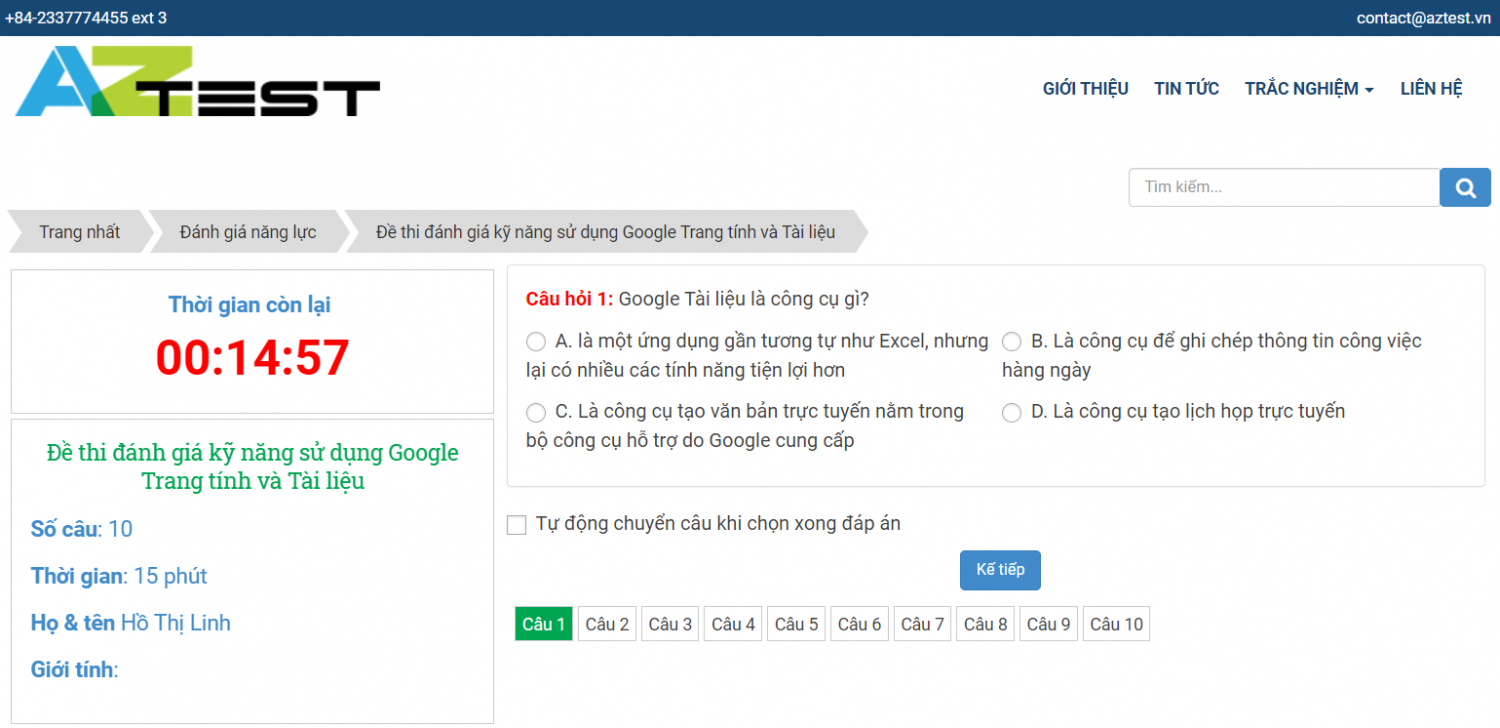
<p dir="ltr" style="text-align: justify;">Để giúp doanh nghiệp hình dung dễ dàng hơn về cách tạo đề thi trắc nghiệm, AZtest đã tạo bộ đề thi mẫu: Đề thi trắc nghiệm đánh giá kỹ năng sử dụng Google Trang tính và Tài liệu có thời gian thi 15 phút. Bộ đề thi bao gồm 10 câu hỏi và được tính theo thang điểm 10.</p>

<div style="text-align:center">
<div class="image-center">
<figure class="image" style="display:inline-block"><img alt="tao de dang gia ky nang google trang tinh va tai lieu" height="388" src="http://taodethitracnghiemonline.aztest.vn/uploads/taodethitracnghiemonline/news/2021_06/tao-de-dang-gia-ky-nang-google-trang-tinh-va-tai-lieu.png" width="800" />
<figcaption><em>Bộ đề thi mẫu: Đề thi đánh giá kỹ năng sử dụng Google Trang tính và Tài liệu</em></figcaption>
</figure>
</div>
</div>

<p dir="ltr" style="text-align: justify;">Bạn có thể tham khảo bộ đề thi này <a href="https://taodethitracnghiemonline.com/danh-gia-nang-luc/de-thi-danh-gia-ky-nang-su-dung-google-trang-tinh-va-tai-lieu-146.html">tại đây</a> để có thể tạo ra một ngân hàng bài thi trắc nghiệm đánh giá kỹ năng sử dụng sử dụng Google Trang tính và Tài liệu được phong phú và chất lượng hơn.</p>

<h2 dir="ltr" style="text-align: justify;"><strong>Các mẹo sử dụng hiệu quả Google Trang tính và Google Tài liệu</strong></h2>

<p dir="ltr" style="text-align: justify;">Dưới đây là một số mẹo khi sử dụng Google Trang tính và Google Tài liệu mà người dùng cần nắm trong quá trình sử dụng, cụ thể:</p>

<p dir="ltr" role="presentation" style="text-align: justify;">Mẹo sử dụng Google Trang tính:</p>

<ul>
	<li aria-level="1" dir="ltr">
	<p dir="ltr" role="presentation" style="text-align: justify;">Sử dụng mẫu có sẵn khi tạo báo cáo, thống kê,...</p>
	</li>
	<li aria-level="1" dir="ltr">
	<p dir="ltr" role="presentation" style="text-align: justify;">Để giảm lộn xộn khi sử dụng trang tính cần mở rộng toàn bộ màn hình</p>
	</li>
	<li aria-level="1" dir="ltr">
	<p dir="ltr" role="presentation" style="text-align: justify;">Cố định cột và hàng để luôn thấy dữ liệu</p>
	</li>
	<li aria-level="1" dir="ltr">
	<p dir="ltr" role="presentation" style="text-align: justify;">Đồng bộ trang tính ở mọi thiết bị</p>
	</li>
	<li aria-level="1" dir="ltr">
	<p dir="ltr" role="presentation" style="text-align: justify;">Chia sẻ và cộng tác với mọi người</p>
	</li>
	<li aria-level="1" dir="ltr">
	<p dir="ltr" role="presentation" style="text-align: justify;">Sử dụng tính năng nhận xét và phản hồi</p>
	</li>
</ul>

<p dir="ltr" role="presentation" style="text-align: justify;">Mẹo sử dụng Google Tài liệu:</p>

<ul>
	<li aria-level="1" dir="ltr">
	<p dir="ltr" role="presentation" style="text-align: justify;">Sử dụng mẫu tài liệu có sẵn để tiết kiệm thời gian</p>
	</li>
	<li aria-level="1" dir="ltr">
	<p dir="ltr" role="presentation" style="text-align: justify;">Mở toàn màn hình để giảm lộn xộn</p>
	</li>
	<li aria-level="1" dir="ltr">
	<p dir="ltr" role="presentation" style="text-align: justify;">Đồng bộ tài liệu ở mọi thiết bị</p>
	</li>
	<li aria-level="1" dir="ltr">
	<p dir="ltr" role="presentation" style="text-align: justify;">Chia sẻ và cộng tác với nhiều người</p>
	</li>
	<li aria-level="1" dir="ltr">
	<p dir="ltr" role="presentation" style="text-align: justify;">Sử dụng tính năng nhận xét và phản hồi trong quá trình sử dụng Google Tài liệu&nbsp;</p>
	</li>
</ul>

<p dir="ltr" style="text-align: justify;">Bài viết trên đã chia sẻ đến bạn cách đánh giá kỹ năng sử dụng Google Trang tính và Tài liệu trong doanh nghiệp như thế nào. Trong quá trình sử dụng nếu có điều gì thắc mắc cần được hỗ trợ xin liên hệ với AZtest theo số hotline <strong>0233 777 4455 </strong>(Ext 3) để được nhân viên tư vấn hỗ trợ tận tình.&nbsp;</p>

<p dir="ltr" style="text-align: justify;"><em><strong>&gt;&gt;&gt; XEM THÊM: <a href="https://aztest.vn/news/tin-doanh-nghiep/huong-dan-tao-de-danh-gia-ky-nang-su-dung-cong-cu-tich-hop-tren-google-722.html">Hướng dẫn tạo đề đánh giá kỹ năng sử dụng công cụ tích hợp trên Google</a></strong></em></p>

<p dir="ltr" style="text-align: justify;">--------------------------------------------<br />
AZtest là hệ thống tạo lập website thi trắc nghiệm trực tuyến do&nbsp;<strong><a href="https://tdfoss.vn/">CÔNG TY TNHH PHÁT TRIỂN VÀ DỊCH VỤ NGUỒN MỞ THUẬN ĐỨC</a>&nbsp;</strong>phát triển.&nbsp;Với AZtest, người dùng có thể dễ dàng sở hữu một website tổ chức ôn tập, thi trắc nghiệm trực tuyến hoàn toàn miễn phí, độc lập, được cá nhân hóa theo yêu cầu của người quản trị.<br />
Liên hệ hotline&nbsp;<strong>02337774455 (Ext 3)</strong>&nbsp;hoặc Fanpage&nbsp;<a href="https://fb.me/aztest.vn"><strong>https://m.me/aztest.vn</strong></a>&nbsp;để được tư vấn trực tiếp bởi đội ngũ kỹ thuật viên của AZtest.<br />
<em><strong>&gt;&gt;&gt; Nguồn:&nbsp;<a href="https://aztest.vn/news/tin-doanh-nghiep/huong-dan-tao-de-danh-gia-ky-nang-su-dung-google-trang-tinh-va-tai-lieu-trong-doanh-nghiep-726.html">https://aztest.vn/news/tin-doanh-nghiep/huong-dan-tao-de-danh-gia-ky-nang-su-dung-google-trang-tinh-va-tai-lieu-trong-doanh-nghiep-726.html</a></strong></em></p>
		</div>
	</div>
	<div id="footer" class="clearfix">
		<div id="url">
			<strong>URL của bản tin này: </strong><a href="http://taodethitracnghiemonline.aztest.vn/news/savefile/huong-dan-tao-de-trac-nghiem/huong-dan-tao-de-danh-gia-ky-nang-su-dung-google-trang-tinh-va-tai-lieu-trong-doanh-nghiep-83.html" title="Hướng dẫn tạo đề đánh giá kỹ năng sử dụng Google Trang tính và Tài liệu trong doanh nghiệp">http://taodethitracnghiemonline.aztest.vn/news/savefile/huong-dan-tao-de-trac-nghiem/huong-dan-tao-de-danh-gia-ky-nang-su-dung-google-trang-tinh-va-tai-lieu-trong-doanh-nghiep-83.html</a>

		</div>
		<div class="clear"></div>
		<div class="copyright">
			&copy; taodethitracnghiemonline
		</div>
		<div id="contact">
			<a href="mailto:contact@aztest.vn">contact@aztest.vn</a>
		</div>
	</div>
</div>
	<div id="timeoutsess" class="chromeframe">
		Bạn đã không sử dụng Site, <a onclick="timeoutsesscancel();" href="http://taodethitracnghiemonline.aztest.vn/#">Bấm vào đây để duy trì trạng thái đăng nhập</a>. Thời gian chờ: <span id="secField"> 60 </span> giây
	</div>
	<div id="openidResult" class="nv-alert" style="display: none"></div>
	<div id="openidBt" data-result="" data-redirect=""></div>
<div id="run_cronjobs" style="visibility:hidden;display:none;"><img alt="cron" src="/index.php?second=cronjobs&amp;p=z00k6NG9" width="1" height="1" /></div>
<script src="http://taodethitracnghiemonline.aztest.vn/assets/js/jquery/jquery.min.js"></script>
<script>var nv_base_siteurl="/",nv_lang_data="vi",nv_lang_interface="vi",nv_name_variable="nv",nv_fc_variable="op",nv_lang_variable="language",nv_module_name="news",nv_func_name="savefile",nv_is_user=0, nv_my_ofs=7,nv_my_abbr="+07",nv_cookie_prefix="nv4c_4tbfAL",nv_check_pass_mstime=28738000,nv_area_admin=0,nv_safemode=0,theme_responsive=1,nv_recaptcha_ver=2,nv_recaptcha_sitekey="",nv_recaptcha_type="image",XSSsanitize=1;</script>
<script src="http://taodethitracnghiemonline.aztest.vn/assets/js/language/vi.js"></script>
<script src="http://taodethitracnghiemonline.aztest.vn/assets/js/DOMPurify/purify3.js"></script>
<script src="http://taodethitracnghiemonline.aztest.vn/assets/js/global.js"></script>
<script src="http://taodethitracnghiemonline.aztest.vn/assets/js/site.js"></script>
<script src="http://taodethitracnghiemonline.aztest.vn/themes/default/js/news.js"></script>
<script src="http://taodethitracnghiemonline.aztest.vn/themes/template_pgd/js/main.js"></script>
<script async src="http://taodethitracnghiemonline.aztest.vn//pagead2.googlesyndication.com/pagead/js/adsbygoogle.js"></script>
<script>
		  (adsbygoogle = window.adsbygoogle || []).push({
		    google_ad_client: "ca-pub-1191237483249472",
		    enable_page_level_ads: true
		  });
		</script>
<script async src="https://www.googletagmanager.com/gtag/js?id=UA-163906928-1"></script>
<script>
      window.dataLayer = window.dataLayer || [];
      function gtag(){dataLayer.push(arguments);}
      gtag('js', new Date());
      gtag('config', 'UA-163906928-1');
    </script>
<script src="http://taodethitracnghiemonline.aztest.vn/themes/template_pgd/js/bootstrap.min.js"></script>
<script src="http://taodethitracnghiemonline.aztest.vn/themes/template_pgd/js/jquery.sticky-kit.min.js"></script>
<script>
		$(document).ready(function() {
			$('.sticky').stick_in_parent({
				parent: "body",
				offset_top: 10
			});
		});
	</script>
</body>
</html>